Hospitality IPTV set top box and remote control basic
Get a feel for the remote and learn the basics about the set top box.
The current Hospitality IPTV set top box is the Amino Amigo 7Y.
On the back of the set top box you will find ports for:
- Power input
- HDMI
- Ethernet
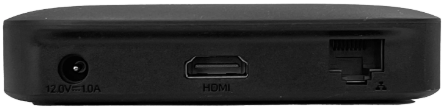
Note: On the side of the set top box there are two USB ports and a microSD card port that are not needed for the Hospitality IPTV service. The USB ports cannot be used to charge other devices.
When the device is plugged in, you will see a light on the front of the box.
- A blue light indicates that the set top box is ON
- A red light indicates that the set top box is OFF.
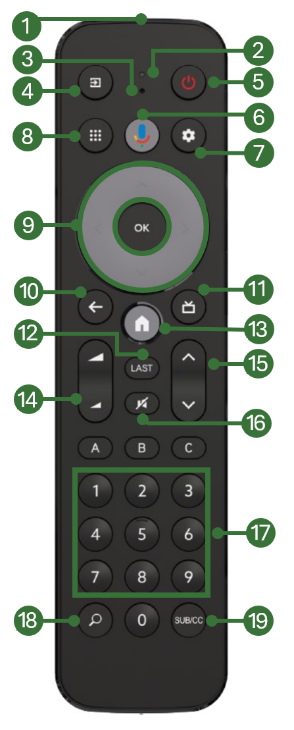
The current Hospitality IPTV Remote Control unit is called ‘Lima’.
The remote can be paired to the set top box either through IR (Infrared) or Bluetooth. Please see the article Pairing and Disconnecting Hospitality IPTV Remote Controls for further information on that action.
The Lima remote control requires 2 x AAA batteries to operate.
The below image shows the function of each button.
 |
|
Note: The A, B, and C buttons are customizable but currently not configured. Their functions may change in the future.
